Youtube Video
Geet 16th September 2011 Part 1
Geet 16th September 2011 Part 2
Geet 16th September 2011 Part 3
Geet 16th September 2011 Part 4
Youtube Video
Geet 16th September 2011 Part 1
Geet 16th September 2011 Part 2
Geet 16th September 2011 Part 3
Geet 16th September 2011 Part 4
Apple has offered the new OS ie iOS4.2 for iPhone and once you upgrade your device to this latest version, the phone would get locked again and you will have to perform the Jailbreaking procedure again. The Jailbreakme.com procedure which we mentioned previously is not compatible with this OS.
Before you start with this process you will have to make sure that you have the iPhone Firmware – iOS 4.2 Beta 1 available with you on your computer which is currently available under the Apple’s developer or enterprise program. Next Download Apple iTunes 10 and install it on your computer.
This Jailbreaking procedure will only work on Apple Mac based computers since the Pwnagetool is available in .dmg format only here. Make sure that the device was earlier jailbroken with other other tools.
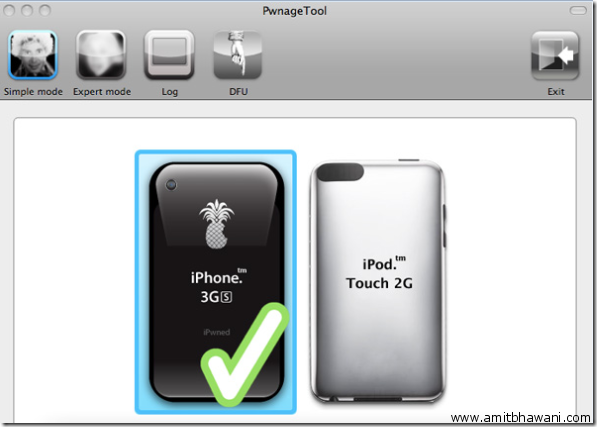
Download the PwnageTool 4.01 along with the PwnageTool Bundle and save the same on your computer. Start installing the files after extraction which were downloaded and then launch the PwnageTool Bundle.
Select Expert Mode and while jailbreaking select the .ipsw firmware file which you had downloaded and continue with the process which will create a new custom firmware which has to be restored using iTunes program following which your Apple iPhone would be jailbroken.
iPhone might be the leading Smartphone in the market famous and very popular for its interface and the way which with it manages phone, games, internet, networking and useful day to day stuff is great but iPhone has been deprived of some of the basic features which are very much useful for our day-to-day usage as a phone – Group Texting this feature which is even available in the most basic phone available in the market, which will make texting of sending forwards a lot easier rather than selecting each name searching from the hundreds of contacts in your contact list.
But apple has allowed an App called “Group Texter “ to do the same, with group texter you can create groups like you can do in even some of the basic a low-end models now released in the market.
You can download “Group Texter” App from the iTunes > App Store. It is a totally free application.
How to Create Groups:
1) Go to iTunes > App Store > Search > type – Group texter and install the app.
2) Go to the App and then you will find a ”+“ sign on the Right side top of the page and click on it.
3) After that you will be asked “Set Group Name”
4) On clicking on the Group name you will be getting 2 option namely Add contacts on the left side andcreate message option on the right
How to Send Messages to Groups:
1) After you have created your required groups, you can just open the App to view your respective Groups.
2) Then with a single tap you can select your required group and then copy paste or type any message and then send it, where the create message option is on the right side on clicking the Group name.
Have fun with this App which does not even require you to Jailbreak your iPhone.
Here is an easy and pretty simple way to turn your multitasking off in your iPhone 3g which according to Apple is not prepared to support multitasking due to its low Ram compared to the iPhone 3GS. But sometimes Multitasking can be really helpful sometimes and sometimes can become a big headache as it makes you iPhone 3G very slow and frequently gets stuck.
To overcome this problem of using RedsnOw every time you want to Enable or Disable Multitasking in iPhone 3G this simple App from Cydia can do it in a single tap, it also gives you option to switch of Background wallpaper.
The App: zToggle
You can download this app from the Cydia application using the following process.
Requirements:
Jailbroken iPhone 3G with Redsnow and Cydia Already installed
Step wise Procedure:


With this App you can easily Enable or Disable Multitasking and Background Wallpaper, which will considerably improve your iPhones performance.
Enjoy your iPhone 3G with better performance.
Apple India now features all the latest stuff which was announced in the recent keynote by Mr Steve Jobs. Last time we had published the Apple Laptops Price List where in we had listed the Apple MacBook Latest Prices along with information on the Student Discount Prices.
Apple iPod Touch 8GB :
Apple iPod Touch 16GB :
Apple iPod Touch 32GB :
The new Apple iPod Touch series starts at Rs 15,400 onwards for the 8Gb model and comes with HD Recording capability. In terms of money its not really a value for money product considering the price and features because there are many different gadgets like the Archos Android Tablets which also offer similar features but at a fraction of the costs.
Dont forget, when buying a Apple product you are not actually paying for the product but also for the Brand Name!
Google Sync allows you to synchronise Google Services like:
Unless you want to delete all the existing Contacts and Calendars on your phone, select the Keep on my iPhone option when prompted. This will also allow you to keep syncing with your computer via iTunes.
Requirements:
Stepwise illustration of the Process:


After you have setup your iPhone with google you can later go to Settings > Mail, Contacts, Calenders > Google Mail. After going into your account you will later get various options to manage your Google account information with iPhone – Mail, Calender & Notes.
By using these options you can switch off or switch on the various options of mail, calender and notes. And you can see another option – Archive Messages which can be used to decide whether to save your deleted messages in your mail folder or not. And at the bottom an Option to Delete your Account.
iOS 4.0 has given the option of adding multiple accounts to your iPhone, so that you can manage multiple accounts from your iPhone.